Target: 10.129.29.73
Cap is an Easy-rated Linux machine on HackTheBox. The name is a hint: the root path involves Linux capabilities, a feature of the kernel that grants fine-grained privileges to binaries without making them full setuid root. The path to root requires finding an IDOR in a web dashboard, recovering plaintext credentials from a captured network dump, and exploiting an overly permissive capability assigned to Python.
This writeup was produced from notes I took during the CTF, then expanded with the help of an LLM. That is the workflow I am going with going forward: take raw notes while the machine is fresh, then use an LLM to turn them into a proper writeup after the fact. It keeps me focused on the actual work during the CTF rather than stopping to write prose, and it means I still get a record of everything including the dead ends.
Recon
After downloading the OpenVPN config from HTB, I connected to the lab network:
sudo openvpn <file.ovpn>
Once the output showed the connection was initialised successfully, I ran a full port scan against the target:
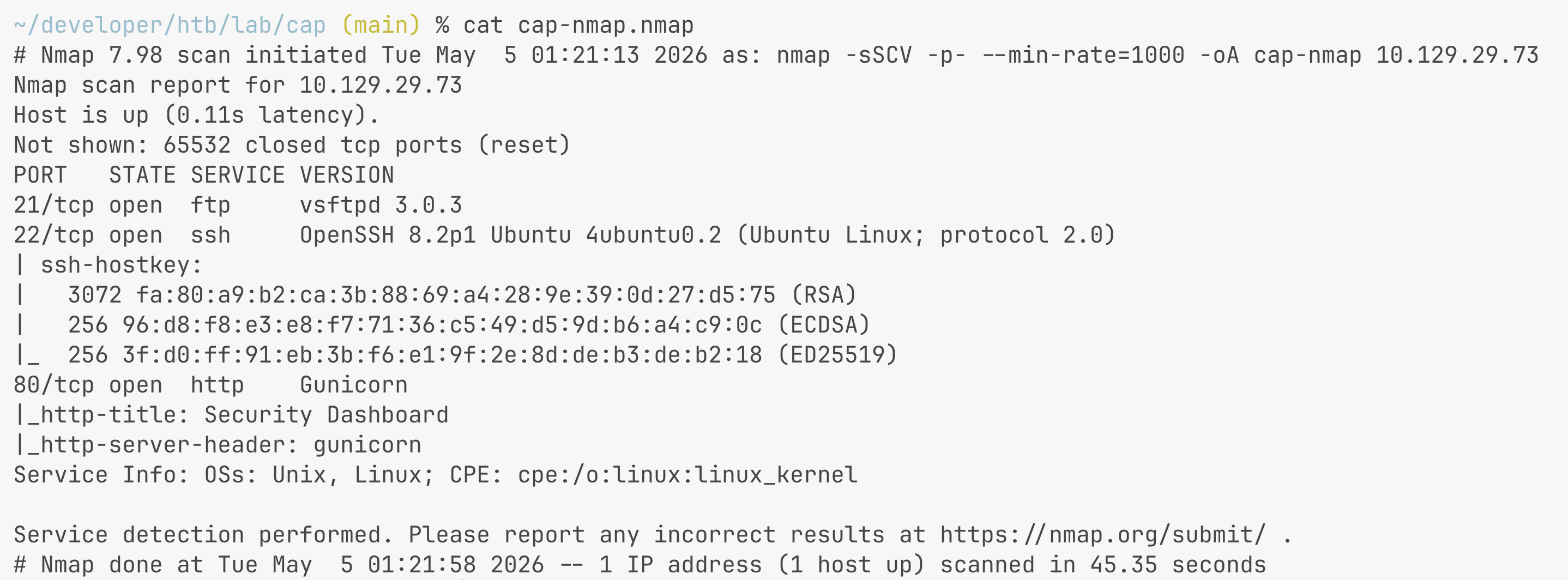
sudo nmap -sSCV 10.129.29.73 -p- --min-rate=1000 -oA cap-nmap
The flags here do a few things together. -sS is a SYN scan, which is faster and less noisy than a full TCP connect scan. -C runs default scripts against open ports to pull out service information. -V enables version detection. -p- scans all 65535 ports rather than just the top 1000. --min-rate=1000 keeps the scan moving at a reasonable pace. -oA saves the output in all three formats (normal, XML, and grepable) so I have a record to refer back to.
The scan came back with three open ports: 21 (FTP, vsftpd 3.0.3), 22 (SSH, OpenSSH 8.2p1), and 80 (HTTP, Gunicorn serving a Security Dashboard). FTP being open is worth noting immediately alongside the web service.
Enumeration
The machine exposes an HTTP web interface on port 80. No HTTPS, just plain HTTP.
After poking around the dashboard manually, one thing stood out: the URL for the packet capture data endpoint followed a numeric pattern, specifically /data/. The currently authenticated user's captures loaded under /data/1 or similar. The natural question was whether other users' captures were accessible by simply changing the ID to another number. This is a classic Insecure Direct Object Reference (IDOR), where access control is missing on a resource that should be user-scoped.
To test this systematically, I generated a numeric wordlist and used Gobuster to enumerate the endpoint:
seq 0 1000 > ids.txt
gobuster dir -u http://10.129.29.73/data/ -w ids.txt -b 302
The -b 302 flag told Gobuster to treat HTTP 302 responses as failures and exclude them from results. Without this, everything came back as a hit because the server was redirecting unauthenticated or invalid requests, which would have produced a useless list of false positives. Filtering on the redirect code narrowed results down to only the IDs that returned actual content.
/data/0 came back as a valid hit. That ID belonged to a different user's session, not mine.
Exploitation
Navigating to /data/0 in the browser surfaced a download link for a PCAP file. This file contained raw packet captures from another user's session, which the server had no business serving to me.
I opened it with tshark to get a quick read on what was inside:
tshark -r 0.pcap
The capture contained FTP traffic. FTP sends credentials in plaintext over the wire, so the username and password were visible directly in the packet data. This is exactly the kind of thing that a packet capture made during an active FTP session would expose.

With those credentials in hand, I tried SSH access as nathan:
ssh nathan@10.129.29.73
The FTP password worked for SSH as well. Password reuse across services is one of those things that keeps showing up in the wild and in CTFs both.
Privilege Escalation
The machine name and the HTB lab description both pointed toward Linux capabilities, so that was the first thing to check:
getcap -r / 2>/dev/null
Output:
/usr/bin/python3.8 = cap_setuid,cap_net_bind_service+eip
cap_setuid is the relevant one here. It allows a process to call setuid() and change its user ID to any value, including 0, which is root. On a normal binary this capability would be tightly controlled, but on a general-purpose interpreter like Python it is essentially a root shell waiting to happen.
I answered the HTB question by submitting /usr/bin/python3.8 as the binary with the dangerous capability.
The First Attempt That Did Not Work
The first command I found came from another writeup:
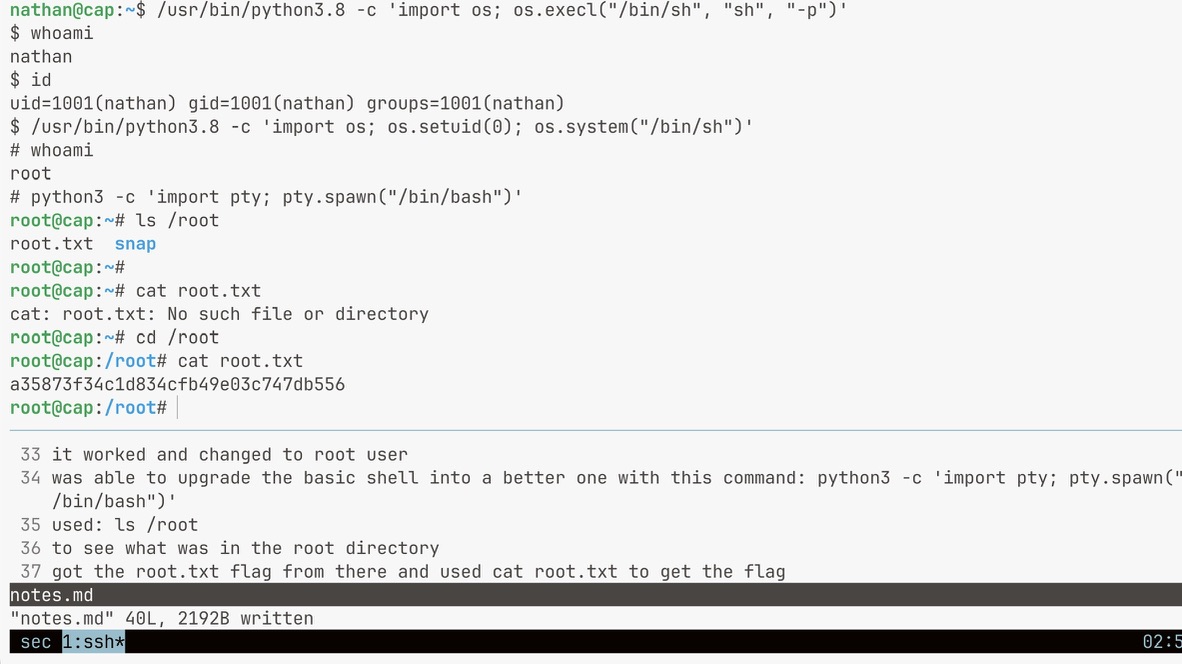
/usr/bin/python3.8 -c 'import os; os.execl("/bin/sh", "sh", "-p")'
This did not work. The shell opened, but id and whoami both still showed nathan. The reason is subtle: os.execl replaces the current process with /bin/sh. The -p flag tells the shell to run in privileged mode, which prevents it from dropping the effective UID when it differs from the real UID. The problem is that no one has actually called setuid(0) at this point. cap_setuid gives the Python process the ability to call setuid(), but os.execl skips that step entirely and just hands off execution to the shell. The shell opens with the same real and effective UID as before, so -p has nothing to preserve. The capability was never used.
What Actually Worked
/usr/bin/python3.8 -c 'import os; os.setuid(0); os.system("/bin/sh")'
This calls os.setuid(0) first, which invokes the setuid() syscall. Because cap_setuid is present on the Python binary, the kernel permits this call and changes the process UID to 0. Only then does Python spawn a shell via os.system. The shell inherits the UID that was just set, which is root.
The capability has to be exercised within the Python process before spawning a child. Passing a flag to the child shell and hoping it figures it out does not work.
Upgrading the Shell
The shell from os.system is minimal and non-interactive. I upgraded it to a full PTY:
python3 -c 'import pty; pty.spawn("/bin/bash")'
Flags
cat ~/user.txt
cat /root/root.txt
Key Takeaways
The IDOR on the /data/ endpoint is the kind of vulnerability that gets missed when developers test only their own user flows. Sequential integer IDs without authorization checks on access mean any authenticated user can read any other user's data. The fix is an ownership check before serving the file, not obscuring the ID format.
FTP is unencrypted by design. Capturing a session and reading the credentials out of the PCAP requires no active attack, just access to the network traffic. Any service still using FTP for transfers is leaking credentials to anyone who can see the wire.
cap_setuid on a general-purpose interpreter is functionally equivalent to making that interpreter setuid root. The capability system is intended for targeted use on binaries with narrow, well-understood behavior. Granting it to Python means every Python one-liner on the system can become a root shell.
The failed first attempt was useful. It forced me to understand why os.execl with -p does not actually use cap_setuid, and what the difference is between handing off execution to a child process versus calling the privileged syscall directly in the parent. That distinction applies well beyond this one machine.